Description
Our Twitch notification module is designed to provide your community members with an advanced, interactive and automated stream tracking experience on Discord!
🔄 Three-step workflow
Section titled “🔄 Three-step workflow”- Stream start detection
- Automatic data updates
- Managing interruptions and stream end
- 🟢 If the stream restarts, the notification turns green again (active stream) ✅
- 🔴 Otherwise, after this delay, the message turns red, considered as a stream end, and all final statistics are displayed: start time, end time, stream duration, peak viewers & number of new followers (The pre-configured stream end image will be displayed) 📋
- 🟠 During the interruption, the status is indicated in orange on the message to warn of any anomaly ⚠️
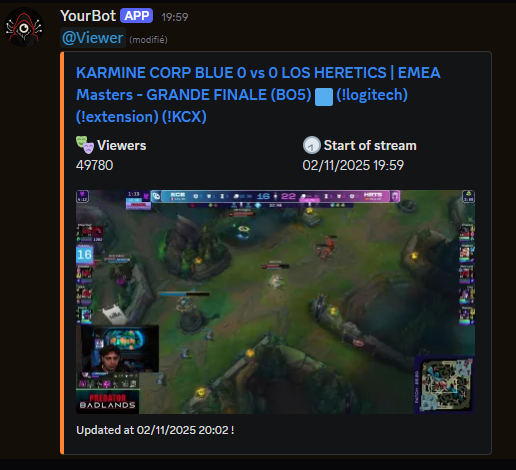
As soon as the stream starts, the module automatically creates a notification in the Discord server by retrieving the pre-configured stream start image and creating a ping to the configured role, displaying a dynamic preview and all useful stream information (viewer count 👀 & start time ⏰).

Every minute ⏱️, the module analyzes the stream’s evolution in real-time: it updates the Discord message with new statistics 📈 (viewer count 🎉 & a stream screenshot 📸).
Members thus have fresh information if they come to see the notification later. This ensures that the streamer is still live if the notification is read later!

If the stream experiences an interruption 🔌, the module checks for 10 minutes ⏳ if the interruption is temporary (connection loss, restart…).

✨ System benefits
Section titled “✨ System benefits”- 👁️ Real-time visibility of streamer activity directly on Discord
- 🎨 Enhanced community engagement through dynamic and illustrated notifications
- 📚 Automatic history: the entire stream timeline (statistics, evolution) is archived in a single Discord message, for each stream 🗂️
- 🔄 Update a voice channel to display the number of followers on the Twitch channel when the live stream starts and ends

With this module, each Twitch stream becomes an interactive event 🎊 perfectly integrated into your Discord server, without manual management 🤖, for a more lively atmosphere and complete reporting for each broadcast! 🎉🔥
❗ Important
Section titled “❗ Important”- The module is not functional by only downloading the files; it must be integrated into an already working Discord bot
- We use Prisma as the ORM for database management; ensure your project also uses Prisma or adapt the code accordingly
⚠️ Requirements
Section titled “⚠️ Requirements”- A working Discord bot with the necessary permissions to register slash commands
- You should have knowledge in Discord bot development (Javascript) & database management to use this script in order to adapt it to your needs
Files/folders
Section titled “Files/folders”Directoryimages
Directoryscreen-live/ Contains temporary stream images
- …
- offline.png
- online.png
Directoryprisma
- schema.prisma Data model for the module (Prisma)
Directoryutils
Directorynotification
- twitch.js Functions used to manage module notifications
- environment.js Utility function for writing a variable to the
.envfile - utils.js Reusable functions
- .env Required environment variables
- index.js Script entry point
- package.json Required dependencies
Dependencies & Versions
Section titled “Dependencies & Versions”Here are the versions used for development and testing of the script:
- @prisma/client@6.18.0
- discord.js@14.24.0
- dotenv@16.6.1
- moment@2.30.1
- fs@0.0.2
- axios@0.26.1
- uuid-js@0.7.5
- utf8@3.0.0